![[X25]❄️ +1 Speed Snow Keyboard Escape Wiki logo](/images/site/logo.webp)
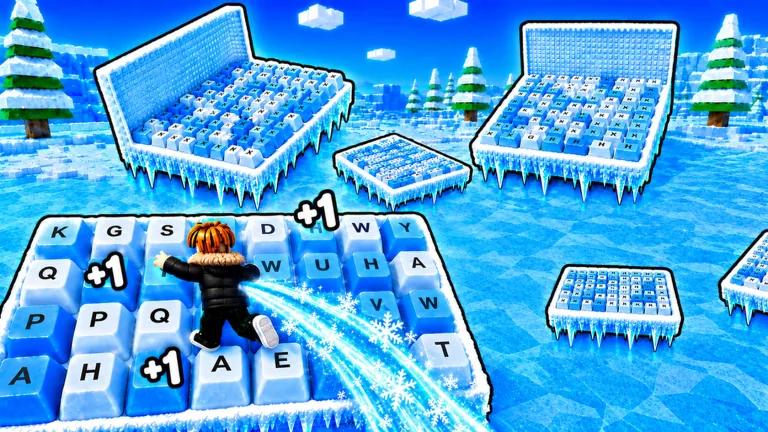
Your first run in five steps
The fastest way to learn is to separate progress from control. Walk to build Speed, inspect the counters on your screen, and then test one short part of the snowy keyboard course. Do not spend your first session chasing the largest number you can see. Extra pace only helps when you can still stop, line up, and land.
Start with these five steps:
- Move in a safe area and confirm that ordinary steps raise Speed.
- Find the Speed, Level, Wins, and Custom Speed displays in the current interface.
- Approach the first obstacle at a pace you can control.
- Watch the obstacle for one complete cycle before committing.
- After a failure, change one thing, such as timing, angle, or Custom Speed. Then try again.
The official game description said that each step added one Speed in September 2026. Multipliers and updates can change the number you see, so trust the counter in your current server.
Understand the core loop
This is an incremental obstacle game built around a simple tension: movement makes you faster, but the course demands precision. Snowy keyboard keys form the route. Reaching later parts of a run can award Wins, while visible systems such as multipliers, Level, Rebirth, and another world give you longer-term goals.
| Part of the loop | What to do now | What not to assume |
|---|---|---|
| Build Speed | Walk and watch the Speed counter | That every player gains at the same boosted rate |
| Test movement | Use a short, repeatable runway | That more accumulated Speed always makes jumps easier |
| Cross obstacles | Observe, line up, jump, then stabilize | That one failed timing proves the route is impossible |
| Collect Wins | Read the reward shown at the stage or finish | That a recorded player’s reward is today’s default |
| Improve progress | Check the live Level, multiplier, and Rebirth panels | That old requirements or reset rules still apply |
As a beginner, build some Speed, test your movement, cross a section, and collect the reward. Check the counters again before you decide what to do next. The numbers make more sense when you connect each change to an action.
Read the counters before you buy or reset
Several numbers can rise during play, but they do different jobs. Speed affects how quickly your character moves. Custom Speed lets you make that movement manageable. Wins appeared after successful course progress during play. Level and Rebirth belong to progression, but you need to read their current requirements and reset effects in the game panels.
Before pressing a purchase, teleport, or Rebirth button, pause and read three things:
- the requirement displayed beside the action;
- the confirmation text describing what changes or resets;
- the counters that remain visible after the action.
That ten-second check is more valuable than memorizing a number from an older run. It also prevents you from confusing a temporary multiplier with your normal gain.
Make the first obstacles predictable
New players often react to the obstacle only after they have already started moving. Reverse that order. Stop at a safe edge, watch the moving part complete a cycle, and choose a visual cue for your start. Keep your camera aligned with the landing area rather than looking down at your avatar.
For a normal gap, use a repeatable setup:
- Stand the same distance from the edge on each attempt.
- Point the camera through the center of the landing key.
- Begin moving with the same input pattern.
- Jump from a consistent point.
- Release or correct movement after landing instead of holding forward blindly.
If you overshoot, lower the visible Custom Speed in a small step and repeat the same jump. If you fall short, first check whether you jumped too early or lost momentum. Changing the setting, angle, and timing together makes it impossible to learn which fix worked.
Recover from a restart without tilting
One wrong step can start the run over. That makes a fall feel expensive, but the failed attempt still gives you useful information. Name the cause before moving again: early jump, late jump, bad angle, overshoot, moving hazard, or an unstable landing.
Use the next attempt to test only that cause. A moving obstacle deserves a timing change. Repeated overshooting deserves a Custom Speed adjustment. Sliding off after a successful landing deserves an earlier input release. This turns restarts into controlled practice rather than repeated guesses.
You can run into spinning hazards, rolling objects, gaps, and surfaces that punish rushed timing. A heavily boosted run also becomes harder to control. Prepare for those problems, but inspect the course loaded in your server instead of expecting a fixed stage map.
Set a useful first-session goal
Choose a goal you can verify on your own screen. Good first-session goals include completing one new obstacle section, earning the next visible Win reward, finding a controllable Custom Speed range, or learning what the current Rebirth panel says.
Avoid goals based on someone else’s reward total or paid boost. Instead, record your own baseline:
| Measurement | Simple test |
|---|---|
| Speed gain | Note Speed, move for 30 seconds, note it again |
| Run time | Time one successful route from its start point |
| Win reward | Record the value immediately before and after collection |
| Reliable pace | Repeat one jump three times at the same Custom Speed |
These four observations give you enough information to plan the next session. Move to the dedicated Speed guide when growth is the problem, the jump guide when obstacles stop you, or the Wins guide when you want to estimate a target.
Spend the first ten minutes deliberately
Use the opening minutes to learn the interface rather than bouncing between every visible system. First, walk long enough to see which counter reacts. Next, find Custom Speed and test one change in a safe area. Then return it to a manageable setting and approach the course. This establishes cause and effect before treadmills, boosts, or reset decisions make the screen harder to read.
When you reach a reward point, pause again. Record the Wins counter, the displayed reward, and any new area or option that became available. If a shop or progression panel opens, read it without buying. Your first session is successful when you understand what one complete loop changes, even if you do not reach the furthest platform.
Avoid common first-run traps
Grinding before you test the course can leave you with a large Speed number and no idea how to control it. Alternate short training periods with obstacle attempts.
Do not copy the pace of a boosted run. Strong multipliers and paid or admin-related effects can produce rapid Level growth that an ordinary player will not see.
Changing everything after a fall hides the cause. Keep the camera angle, start point, and timing stable when you test a Custom Speed adjustment.
Skip any purchase whose card is unclear. Confirm its currency icon, effect, price, and duration first. Snow coins and shop items are visible in the game, but the current UI needs to tell you how the purchase works.
An available Rebirth button does not mean you should press it. Read the confirmation and check what will reset or remain.
Know when to leave the beginner route
Move to a focused guide once you can explain the basic loop and identify your bottleneck. If you can build Speed but cannot land, work on jump timing and Custom Speed. If you can clear a route but do not know how long a goal takes, measure Wins and run time. If a Level, Rebirth, or world requirement blocks you, inspect that system directly.
Keep each session focused enough to notice improvement. Trying to master every counter, shop item, obstacle, and progression option at once makes it hard to tell what worked.
FAQ
What should I do first in +1 Speed Snow Keyboard Escape?
Walk in a safe area, identify the live counters, and test the opening obstacle at a controllable pace. Learn one reliable jump before grinding more Speed.
Does every step always give exactly one Speed?
That was the rule on the official game page in September 2026. Check the live counter because active multipliers or later updates can change the amount displayed.
Why do I keep overshooting the keyboard keys?
Your current movement pace is probably too high for that setup. Lower Custom Speed slightly, align the camera through the landing, and repeat without changing your timing at the same time.
What happens when I miss a step?
The official description warns that one wrong step starts the run over. Use the current course state and any on-screen prompt to confirm exactly where you return.
When should I use Rebirth?
Open the current Rebirth panel and read the requirement, reset, and retained benefits before confirming. Do not reset based on an old threshold or another player’s boosted session.